ASIN B0D7CNT2BLImage via Amazon
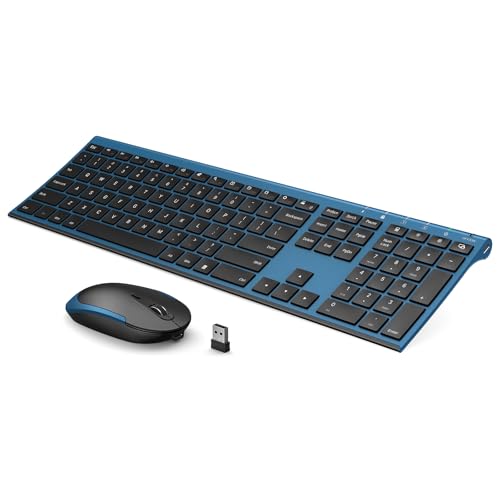
Vssoplor Wireless Keyboard and Mouse, Rechargeable Ultra Slim, Black Blue | Quiet Full-Size Keyboard and Mouse Combo Set, for Laptop, PC, Notebook, Desktop, 2.4GHz Stable Connection, Ideal for Office
- ♥Stable Connection
- ♥Adjustable DPI & Ergonomic Design
- ♥Rechargeable & Auto Sleep Mode
- ♥Full Size & Ultra Slim
$39.99
Price as of Oct 16, 2026, 7:47 AM UTC. Prices and availability are subject to change. The price shown on Amazon at the time of purchase applies.
- Checkout happens securely on Amazon
- Read verified customer reviews first
- Shortlisted by Everstead Finds
Disclosure: this page contains affiliate links. As an Amazon Associate, I earn from qualifying purchases, at no extra cost to you.
Key features
♥Stable Connection
2.4 GHz wireless provides a powerful, reliable connecton up to 10m without any delays. 2 in 1 Nano receiver unifies the keyboard and mouse connections into one USB port, plug and play quickly. NOTE: The switch is on the top right corner of the keyboard
♥Adjustable DPI & Ergonomic Design
3 DPI levels (1000/1600/2400 DPI) allows you to change the cursor sensitivity easily and track more smoothly over a variety of surfaces. Contoured shape fits your hands perfectly, reducing hand fatigue
♥Rechargeable & Auto Sleep Mode
This keyboard and mouse combo can be easily charged with included charging cable. Built-in rechargeable battery supports using for over one month with a single fully charge. It can automatically enter into sleep mode in order to save energy and press any key to wake it up
♥Full Size & Ultra Slim
Ultra slim (5.5mm) keyboard looks more stylish and elegant. High-End Scissor Switch design provides a better tactile response and comfortable and whisper quiet typing experience
♥Hot Keys & Compatibility
The full size keyboard includes fast-access hot keys, versatile function keys and number pad which can improve you work efficiency. Compatible with Computer, Laptop, Desktop, PC, Notebook, Windows XP / Vista / 7 / 8 / 10 or later
♥How to re-pair the keyboard and receiver? Turn on the keyboard switch, hold ESC+Q to enter Pairng Mode. You will see the indicator light flashing. Insert the usb receiver to your computer, place keyboard as close as you can and wait for a bit or until the light stop flashing. And there we paired the keyboard. Pair the mouse: Hold down the mid wheel and right click button and turn on the mouse switch simultaneously, wait for 2 seconds to enter pairing mode. Place mouse as close as you can to pair. Now release the button. Note: If this doesn't work, please turn off all wireless device around you and try the entire process again. Remember to pair the keyboard first, then the mouse.
♥Please Note
The USB receiver is located on the back of the mouse to prevent loss
Vssoplor Wireless Keyboard and Mouse, Rechargeable Ultra Slim, Black Blue | Quiet Full-Size Keyboard and Mouse Combo Set, for Laptop, PC, Notebook, Desktop, 2.4GHz Stable Connection, Ideal for Office
See the latest price, customer reviews and delivery options on Amazon.